Coffee for your Mac.
Morrow keeps your Mac awake — display, disk, the whole machine, your call. Lives in the menu bar, takes one click, leaves nothing behind.
macOS 14 Sonoma or later · Apple Silicon & Intel · ~1 MB
Morrow keeps your Mac awake — display, disk, the whole machine, your call. Lives in the menu bar, takes one click, leaves nothing behind.
macOS 14 Sonoma or later · Apple Silicon & Intel · ~1 MB
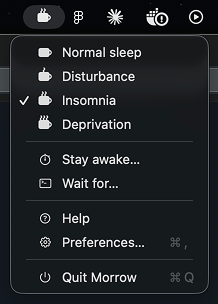
Each menu item is a single click. Pick a mood, get back to work.
A light dose. Stops the machine from going to idle sleep — the screen can still dim. Perfect for long downloads and background jobs.
A double shot. Keeps display, disk and the whole system wide awake. Use it for demos, dashboards, and long sessions.
The full pot. Maximum vigilance — nothing sleeps until you say so. For overnight renders, training jobs and unattended work.
Punch in a number, pick seconds, minutes, hours or days. Morrow turns itself off the moment the timer ends.
Tie wakefulness to a specific running process. When that process exits, Morrow goes back to bed.
Two switches. Launch at login as a proper macOS Login Item, and remember the active mode across reboots.
A small cup-and-steam icon next to the clock. No Dock entry, no Cmd-Tab clutter.
Pick a mood — Disturbance, Insomnia, Deprivation, or set a timer. A checkmark tells you what’s on.
Quit Morrow and every awake-keeping process exits with it. No daemons, no lingering state.
Morrow is ad-hoc signed (no Apple Developer fee), so macOS asks for permission the first time you open it. Just once.
Unzip and drag Morrow.app into /Applications.
First launch is blocked by Gatekeeper. Open System Settings → Privacy & Security and click Open Anyway.
xattr -dr com.apple.quarantine /Applications/Morrow.app
open /Applications/Morrow.app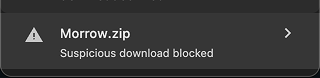
Chrome may flag the download as “suspicious.”
Morrow is ad-hoc signed (no paid Apple Developer cert yet), so Safe Browsing marks unsigned macOS builds automatically. The file is fine — click Keep in Chrome’s download bar.
Want to verify it yourself? Compare the hash:
shasum -a 256 ~/Downloads/Morrow.zip
Expected hash for the current release:
loading…
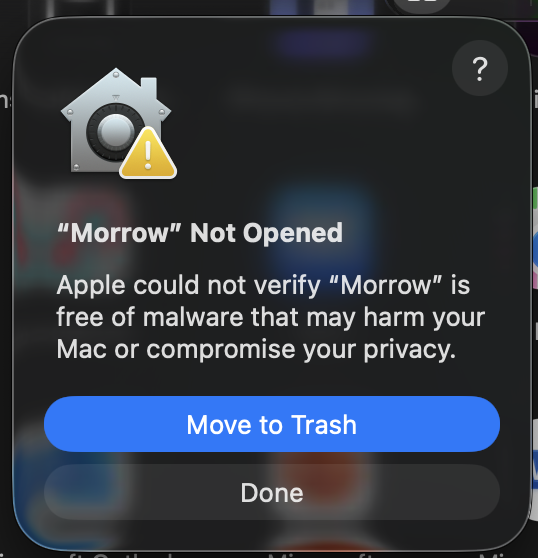
First launch: macOS says “Morrow Not Opened.”
On macOS Sequoia and later, Gatekeeper no longer lets you bypass this with right-click → Open. You go through Settings instead.
Drop a note below — discussions are powered by GitHub, you sign in with your GitHub account once, then ask whatever. I reply directly in the thread.